Posts

Showing posts with the label SQL Server

STUFF function in MS SQL

STUFF function in MS SQL is use to replace the specific potion of this with another string in any sentence.  Syntax: STUFF(“String_Value”,Start_Position,Length,”New_String_Value”); Here in STUFF function you have to pass original string as first parameter (means string on which you have to apply STUFF function), then second parameter you have to pass start position (index) means from where you want to start the replacement, and the in third parameter you have to pass how many character you have to replace, and the last parameter you have to pass new string which you want to add in original string. Example: Select STUFF('This is STUFF Function in MS SQL',15,8,'Method')   OUTPUT: This is STUFF Method in MS SQL

How to install SQL express automatic. OR Silent installation of SQL Express.

Image
For installing the SQL server or SQL express automatically base on single click you have to run command in command prompt with some parameter given below Command Syntax :  <Setup Path> /QS /ACTION=Install /FEATURES=SQL /INSTANCENAME=<Instance Name> /SQLSVCACCOUNT=<DomainName\Username> /SQLSVCPASSWORD=<PC Password> /SQLSYSADMINACCOUNTS=<DomainName\Username> /AGTSVCACCOUNT="NT AUTHORITYNetwork Service" /SECURITYMODE="SQL" /SAPWD=<SQL Password for Sa> Example : E:\Software\FV\SqlExpress2008\SQLEXPR_x64_ENU.EXE /QS /ACTION=Install /FEATURES=SQL /INSTANCENAME=SQLEXPRESS2008 /SQLSVCACCOUNT="nirav" /SQLSVCPASSWORD="n123456" /SQLSYSADMINACCOUNTS="nirav" /AGTSVCACCOUNT="NT AUTHORITYNetwork Service" /SECURITYMODE="SQL" /SAPWD="123456"     Parameters : a.   /QS :=    This will display installation wizard but not gives any type of control for change. b.   /FEATURES=SQL   This will sa...

The setting ‘IACCEPTSQLSERVERLICENSETERMS’ specified is not recognized. OR Result Facility code:1204

Image
In installing the SQL express 2008 with silent installation you have to remove the “/IACCEPTSQLSERVERLICENSETERMS” word from the script. because this will support only for SQL express Service Pack 2 and R2 version so. SQLEXPR_x64_ENU.EXE /QS /ACTION=Install /FEATURES=SQL /INSTANCENAME= SQLEXPRESS2008 /SQLSVCACCOUNT="nirav" /SQLSVCPASSWORD="123456" /SQLSYSADMINACCOUNTS ="nirav" /AGTSVCACCOUNT="NT AUTHORITYNetwork Service" /SECURITYMODE="SQL" /SAPWD="123456"

The setting ‘SQLSVCINSTANTFILEINIT’ specified is not recognized. OR Result Facility code:1204

Image
In installing the SQL express 2008 with silent installation you have to remove the “/SQLSVCINSTANTFILEINIT="True” word from the script. because this will support only for SQL express Service Pack 2 and R2 version so. SQLEXPR_x64_ENU.EXE /QS /ACTION=Install /FEATURES=SQL /INSTANCENAME=SQLEXPRESS2008 /SQLSVCACCOUNT="nirav" /SQLSVCPASSWORD="123456" /SQLSYSADMINACCOUNTS="nirav" /AGTSVCACCOUNT="NT AUTHORITYNetwork Service" /SECURITYMODE="SQL" /SAPWD="123456"

How to get column value from the selected row in data grid in wpf c#.net

Image
Data grid is a control for display the data in tabular format in our application. In data grid when u select any row then for getting this rows unique id write code like : Ex : here we will take ‘ dgcustomer ’ as data grid with following column name (Id,Name,RollNumber,Pass)                         string strid = "" ;                          DataRowView rowview = dgcustomer.SelectedItem as DataRowView ;               strid = rowview.Row[ "Id" ].ToString(); MessageBox .Show( "ID : " + strid);

How to get random element from integer array in c#.net

Image
Now for generating random element from the array first you have to generate the random number and using this random number you can get the random element form the array.   Code : -                     // array of integer                   int[] a={10,20,30,40,50,60,70,80,90};             Random rnd = new Random();             int b = rnd.Next(0,5);             //show the random element in text box             textBox1.Text = a[b].ToString(); For Generating Random rows from dataset here 

How to Generate random rows in dataset using c#.net

Image
For generating the random rows from the data set first you have to generate the random numbae and this number is pass to the dataset CODE:  SqlConnection con = new SqlConnection("Data Source=NIRAV-PC;Initial Catalog=Student;Integrated Security=True");             con.Open();             string str = "select * from StudentDetail";             SqlCommand cmd =new SqlCommand(str,con);             SqlDataAdapter sda = new SqlDataAdapter(cmd);             DataSet ds =new DataSet();             sda.Fill(ds);             Random RandomNumber = new Random();          ...

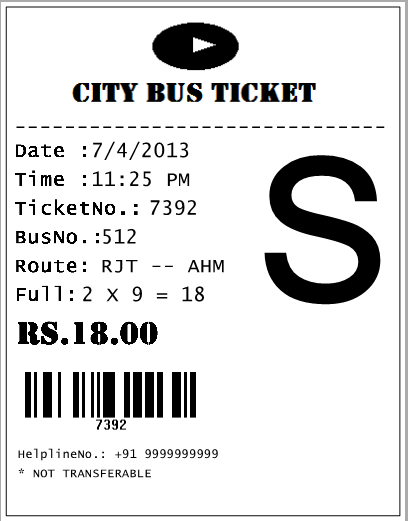
Ticket Generation Using C#.net

Image
                              This article show and learns about how to generate the ticket using c#.net. This describe the how actually ticket (bus ticket) is generate what it will use any how it work              This article presents a solution to solving ticket generation problem using C# and Visual Studio 2010. This application is multipurpose application. This article is use full for many purpose for example city bus ticket generation, store retail ticket generation, in fair for rider tickets etc. This application will solve problem of how to print ticket, how to set margin of text for ticketetc. Follow the Steps: Step -1 In this tutorial first you have to add namespace using System.Drawing.Printing; now start with fist make object of the print document   ‘pd’.this will   ...